RiseGuide Team

To find the best apps for habit tracking, match the app to how you want to track: Habitica for turning habits into a game, Streaks for a simple iPhone tracker, Habitify for planning your day around habits, Loop Habit Tracker for a free and private Android option, HabitNow for flexible tracking on Android, Way of Life for spotting patterns in your data, TickTick for keeping habits beside your to-do list, Finch for gentle self-care, and HabitShare for staying accountable with friends. Pick the one that fits your phone and the kind of nudge you respond to, then track just a couple of habits for a few weeks before you add more.
A habit tracker works in a simple way. You mark a box each time you complete a habit you are trying to build, and the record of marks helps you stay consistent. The harder part is sticking with it long enough for the habit to become automatic. One often-cited UCL study found it took about 66 days on average for a new behavior to become automatic, far longer than the popular 21-day figure, and the time varied widely from person to person. A good app makes those weeks easier by sending reminders, showing your streak, and giving you one place to check in.
The nine habit tracking apps below each take a different approach. Some turn tracking into a game, others keep it simple and fast, and a few are built into a larger to-do app. This guide groups them by what each one is best for, with current App Store and Google Play ratings, so you can choose the habit tracker app that fits your phone and the way you work.
A few things separate an app you keep using from one you abandon after a week. The first is your phone. Some of the best trackers are built only for Apple or only for Android, so your device narrows the options before features do, and if you move between a phone, a tablet, and a computer, you will want one that syncs across them.
The second is what keeps you motivated. A plain checklist is enough for some people and boring for others. If a row of checkmarks does not hold your interest, a game layer or a reminder may help you get through the slower weeks. The third is how much detail you want. Some apps are built around charts and trends, so you can see whether a habit is taking hold, while others keep the data minimal and simply ask you to check in. It also helps to be realistic about the obstacle. If the main problem is distraction rather than forgetting, an app matters less than changing your environment, and our guide to better focus covers that.
App Store (4.3 ⭐) · Google Play (4.7 ⭐)
Best for: people who respond to games and rewards.
Habitica turns your habits, daily tasks, and to-dos into a role-playing game. You build a pixel character that gains experience and gold when you finish real-life tasks and loses health when you skip them. If you enjoy video games, the reward of leveling up can help you stay with habits through the less interesting stretches. You can also join parties with friends and take on quests that go well only when everyone keeps their habits.
Strengths:
Limitations:
App Store (4.8 ⭐)
Best for: iPhone users who want to tap and move on.
Streaks is a fast, clean tracker built for Apple devices. You choose up to a couple dozen tasks, tap to check them off, and build up a streak. It connects to Apple Health, so habits like steps or mindful minutes can be marked complete automatically. For people who want to open the app, tap, and move on, that simplicity is the main appeal.
Strengths:
Limitations:
App Store (4.6 ⭐) · Google Play (4.3 ⭐)
Best for: people who want their habits to read like a daily schedule.
Habitify sorts habits into parts of the day, morning, afternoon, and evening, so your routine reads like a simple timetable. It runs on iPhone, Android, Mac, and the web and keeps everything in sync, which helps if you check in from more than one device. You can also log your mood and add notes next to each habit for context.
Strengths:
Limitations:
Google Play (4.7 ⭐)
Best for: Android users who want a free, no-frills tracker that respects privacy.
Loop Habit Tracker is a free habit tracker app, open source, with no ads and no accounts. It keeps all data on your phone, which appeals to people who care about privacy. Its habit-strength score rises and falls with how consistently you keep a habit, so one missed day does not reset your progress the way a broken streak does.
Strengths:
Limitations:
Google Play (4.7 ⭐)
Best for: Android users who track more than simple yes-or-no habits.
HabitNow is a polished Android app that handles more than checkboxes. You can track a number, like glasses of water, a timer, like 20 minutes of reading, or a plain check, and schedule each habit in detail. Home-screen widgets and reminders keep your habits in view through the day.
Strengths:
Limitations:
App Store (4.8 ⭐) · Google Play (3.6 ⭐)
Best for: people who want to see whether a habit is really sticking.
Way of Life is built around data. You log each habit as yes, no, or skip, add notes, and the app charts the trend over time, so you can see whether a habit is holding steady or slipping. The skip option is useful for days that should not count against you, such as a planned rest day from the gym.
Strengths:
Limitations:
App Store (4.9 ⭐) · Google Play (4.6 ⭐)
Best for: people who would rather not run a separate habit app.
TickTick is a full to-do and calendar app with a habit tracker built in. If you already use a task app, it lets you manage tasks, reminders, and habits in one place across your devices. The habit section has its own streak view and reminders, so your habits do not get lost among your other tasks.
Strengths:
Limitations:
App Store (4.9 ⭐) · Google Play (4.9 ⭐)
Best for: people who find strict streak apps stressful.
Finch pairs habit tracking with a self-care pet. You look after a small bird that grows as you complete your habits and check-ins, which gives the app a gentle, encouraging feel. It leans toward wellbeing habits, such as mood check-ins, breathing, and gratitude, so it suits people who prefer encouragement over pressure.
Strengths:
Limitations:
App Store (4.6 ⭐) · Google Play (4.4 ⭐)
Best for: people who keep promises better when someone is watching.
HabitShare is built around accountability. You track your own habits, then share selected ones with friends who can see your progress and encourage you. You control who sees what, so you can keep some habits private and share the ones where some social accountability helps.
Strengths:
Limitations:
| App | Best for | Platforms | Rating |
|---|---|---|---|
| Habitica | Turning habits into a game | iOS, Android, Web | 4.3 App Store, 4.7 Play |
| Streaks | A simple iPhone tracker | iOS | 4.8 App Store |
| Habitify | Planning your day around habits | iOS, Android, Mac, Web | 4.6 App Store, 4.3 Play |
| Loop Habit Tracker | A free, private Android tracker | Android | 4.7 Play |
| HabitNow | Flexible tracking on Android | Android | 4.7 Play |
| Way of Life | Spotting patterns in your data | iOS, Android | 4.8 App Store, 3.6 Play |
| TickTick | Habits beside your to-do list | iOS, Android, Web | 4.9 App Store, 4.6 Play |
| Finch | Gentle self-care | iOS, Android | 4.9 App Store, 4.9 Play |
| HabitShare | Staying accountable with friends | iOS, Android | 4.6 App Store, 4.4 Play |
Ratings are an October 2026 snapshot from the US App Store and Google Play and will shift over time.
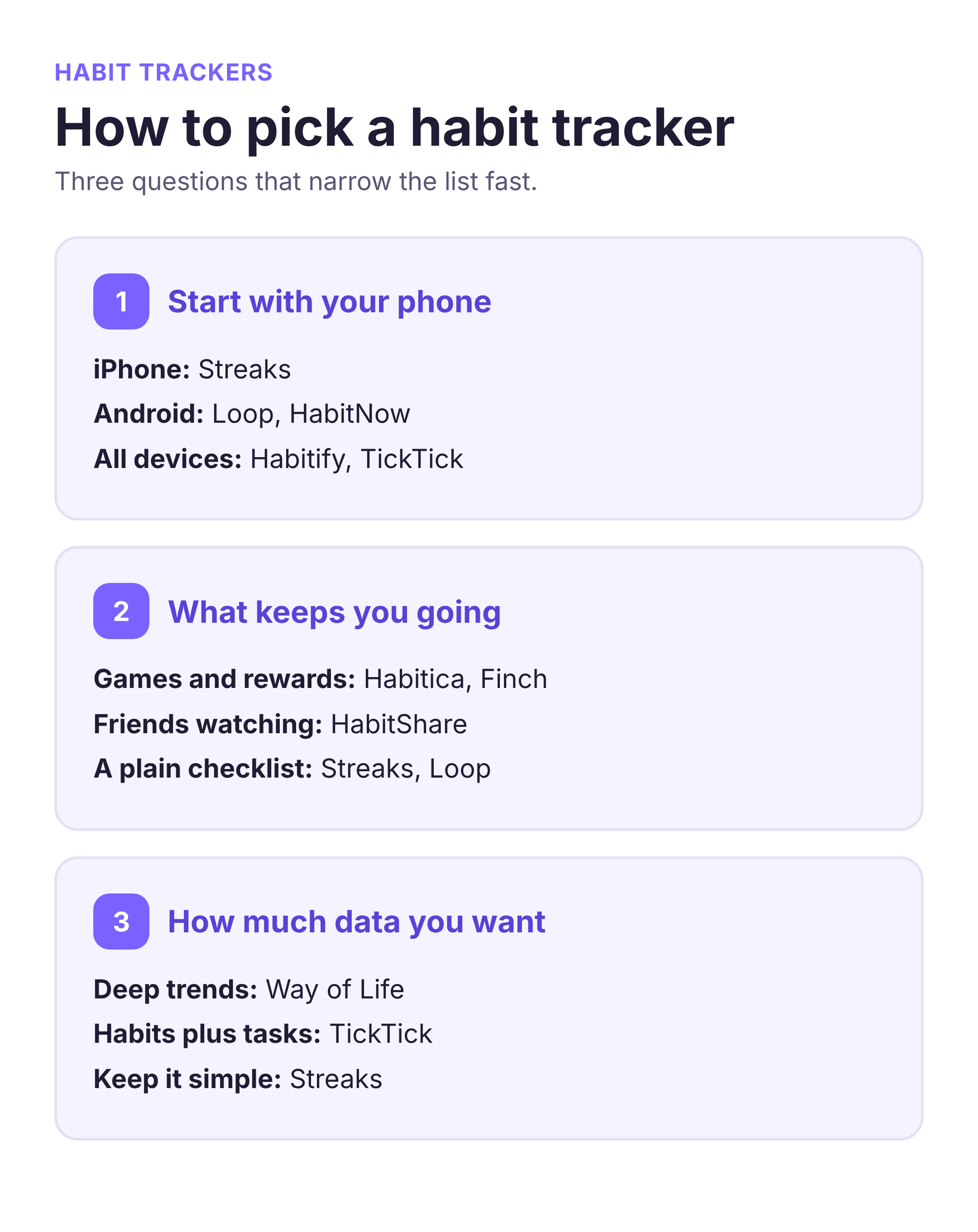
There is no single best habit tracker app; the right one depends on your phone and what keeps you motivated. Start with your phone. If you are on iPhone and want something fast, Streaks is a strong choice. On Android, Loop Habit Tracker and HabitNow are both good options, and Loop is free and stores your data on your device. If you move between devices, choose a cross-platform tracker such as Habitify, TickTick, or Way of Life so your data stays in sync.
Then think about what keeps you motivated. If a plain checklist bores you, the game in Habitica or the self-care pet in Finch can make tracking more engaging. If other people motivate you, HabitShare lets friends follow your progress. If you mainly want to know whether a habit is taking hold, Way of Life gives the clearest view of the trend.
The tracker is only part of the job. An app can show you the streak, but the habit still has to fit into your day. If getting started is the hard part, our team's guide to building habits that stick explains how to make a habit small enough to keep, and our productivity tips and morning routine guides help you fit new habits around the rest of your day. The most useful habit tracking app is the one you will keep opening, so choose the one that fits your phone and the kind of reminder you respond to, and start with just a couple of habits.